
Built so you do not have to take its word for it.
Every feature in Acastus Intelligence exists to answer one question: how do I know this is true? Here is what the Windows app does, and how the pieces fit together.
What you get.
Every claim has a source
Each finding links to the excerpt it came from. Citations are re-checked against the stored source text before a report is published; anything that cannot be traced is removed or marked unverified.
An answer, not a pile of links
Reports open with a direct answer, a side-by-side table, the tradeoffs and what could not be verified.
Evidence explorer
Browse every claim with its status and confidence label, how many independent sources back it, and conflicts between sources. Open the original page or the stored text.
Comparison studio
Compare products, options or ideas on the criteria you choose, with weights you can change and the source behind every value.
Living Research
Keep a topic up to date: scheduled re-checks find what changed and tell you, with a new report version you can compare to the last one. Which plans include it, and how many topics, is shown live on the pricing page.
Export anything
Save reports as PDF, HTML or Markdown, and the evidence as CSV or JSON, with citations intact. You can also print.
Mission control
Watch real stages and counters while research runs. Pause, resume, cancel or retry failed stages; close the app and the server keeps working.
Agent activity
See the actual task graph: which role did what, how many attempts, any errors, and model usage.
Your plan, from your account
Sign in with Google. Your plan and usage are measured on the server and shown as percentages, never as internal units.
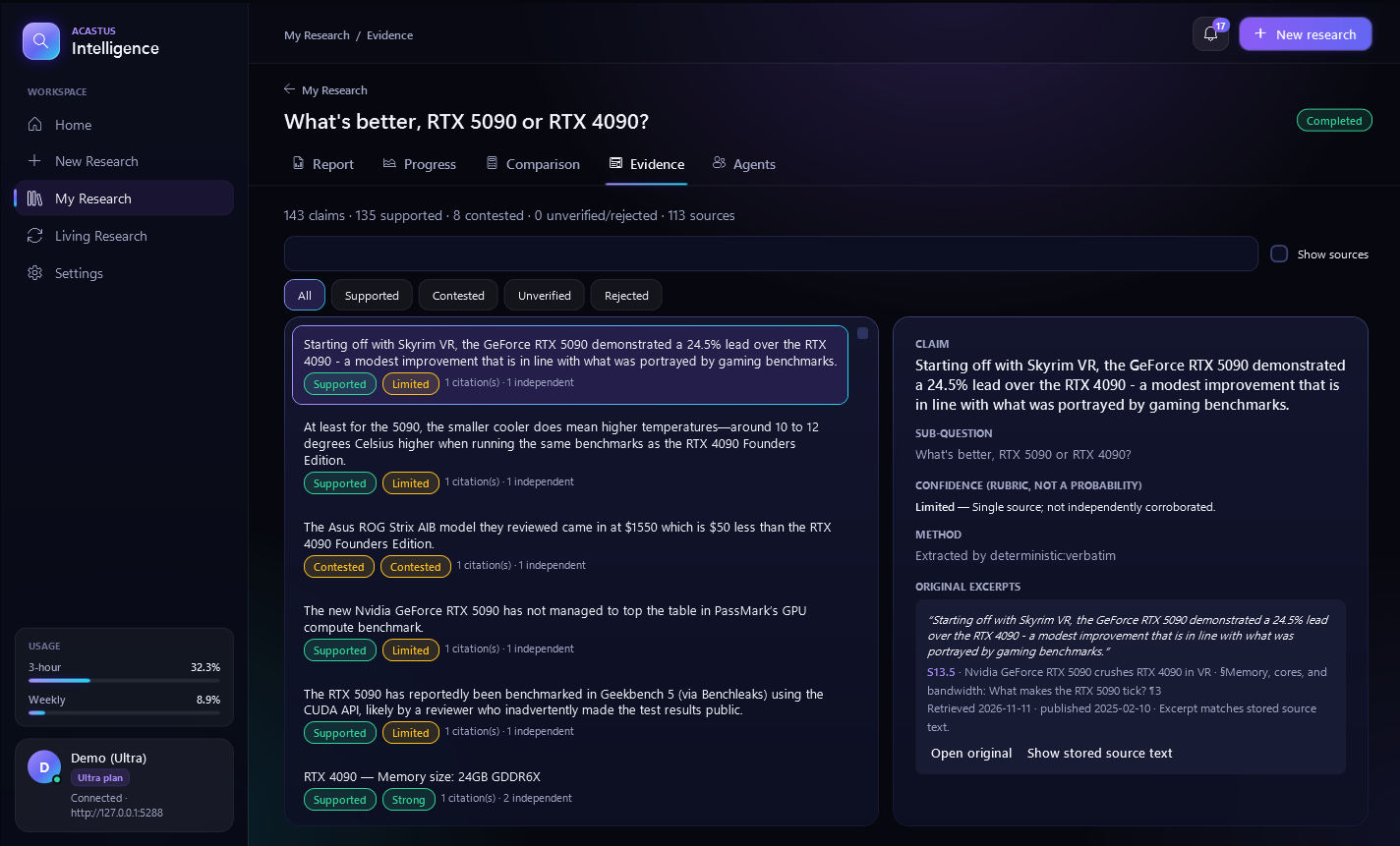
Statuses that mean something.
Every claim carries one of four statuses: Supported, Contested, Unverified or Rejected. The confidence label always comes with its reason, and the original excerpt shows its location, retrieval date and publication date.
Show stored source text displays exactly what was analyzed, so you can check the excerpt in context.
Three ways people use it.
Investigate a question
Ask one question, pick an effort level, and let the agents research. Read the direct answer, then open the evidence for anything that matters to your decision.
Compare options
List what to compare and the criteria, such as
Price (USD, lower)orNoise (dB). Values come only from evidence: Unknown means no verified value, and Conflicting means sources disagree and is left out of scores. Change weights or criteria and recalculate instantly; no new research runs.Keep a topic current
Re-check a completed research on a schedule and see what is new, changed, withdrawn, or that there is no confirmed change. Scheduled checks use the same usage as any research; a check that does not fit is skipped with a notification.
Take the work with you.
| Format | What you get |
|---|---|
| The finished report, with citations. | |
| HTML | The finished report as a web page. |
| Markdown | The finished report as plain text you can edit. |
| CSV | The evidence as a table. |
| JSON | The evidence as structured data. |