
Real PC optimization.
Zero BS.
Astrix is a Windows 11 optimizer with 306 genuinely effective tweaks — every switch maps to a documented, measurable system change. Clean junk, cut latency, boost FPS, kill telemetry. Fully portable — no installer, no bloat, no background services.
Everything it actually does
No mystery "boosts." Each capability is a transparent switch you control, and you can see exactly what it changes.
Reclaim real space
Clears temp files, Windows Update cache, crash dumps, thumbnails and the Recycle Bin — and shows a live estimate of how much it'll free before you run.
Make Windows snappy
Ultimate Performance power plan, foreground priority, zero menu delay, killed startup lag, USB suspend off — the tweaks power users apply by hand.
Squeeze out FPS
Game Mode, hardware-accelerated GPU scheduling, Game DVR off, GPU priority for games, exclusive fullscreen. Less overhead, more frames.
Cut network latency
Disable network throttling, max responsiveness, TCP auto-tuning, Nagle off for gaming, plus one-click Winsock / TCP-IP repair.
Shut down tracking
Telemetry off, DiagTrack disabled, advertising ID, activity history, Bing-in-Start and "suggested" app installs — all gone.
Safe by default
Optional restore point before every run, a confirm prompt, behaviour-changing tweaks off by default, and a full activity log of every action.
Real, measurable gains
Representative before/after results on a mid-range gaming PC (Ryzen 5 5600 + RTX 4060). Your numbers depend on your hardware and how cluttered Windows already is — Astrix won't promise miracles.
Idle RAM usage
Boot time
Numbers are representative, not guarantees — that's the honest part. Run the same test before and after on your own PC to see your real gain.
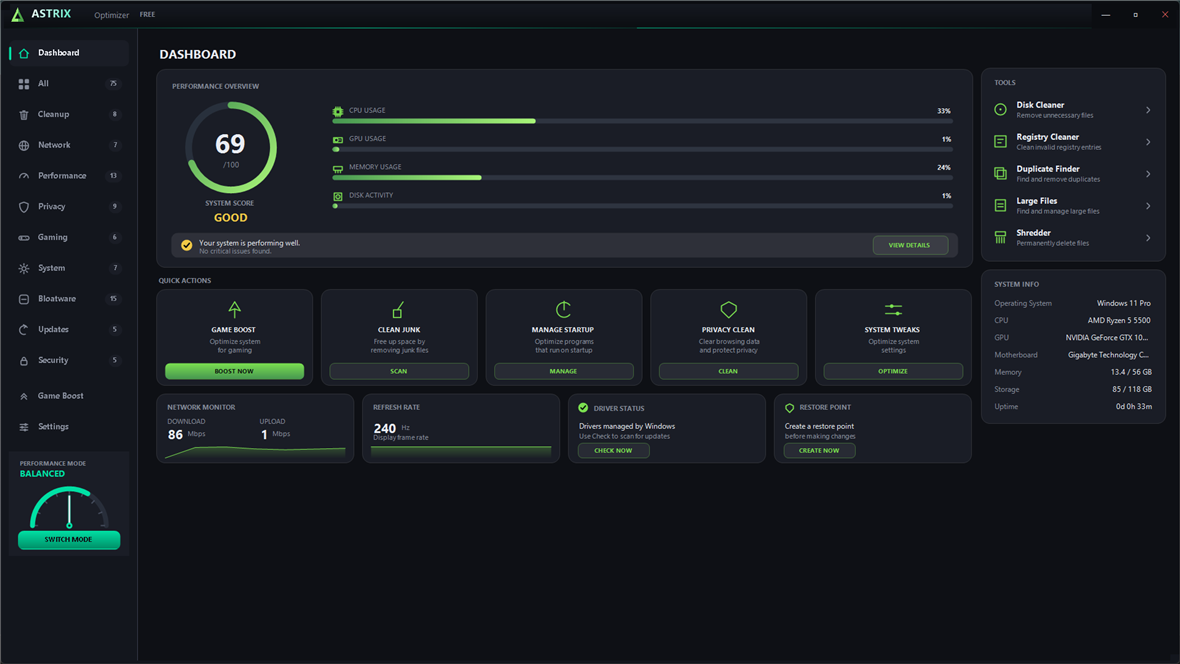
See the real app
An actual screenshot of the Astrix dashboard — live CPU/GPU/RAM/disk, quick actions and tools.
Five steps, fully in your control
No black box. You see — and approve — every stage.
Tuned for the games you play
Game Mode, GPU scheduling, Game DVR off, raw mouse input and RAM freeing target real frame-rate and input-lag wins. Results vary by hardware & settings.
Runs on your PC
Astrix works on any 64-bit Windows 10 or 11 machine — Intel or AMD, NVIDIA or otherwise, SSD or HDD.
Quick compatibility check
Real setups, real gains
Builds from the community. Share yours on Discord to be featured.
Twelve clean categories
Color-coded so you can scan at a glance. Toggle individually, or "Select all" and go.
Cleanup
Reclaim disk space and clear out junk.
16 tweaksNetwork
Lower latency and repair connectivity.
32 tweaksPerformance
Make Windows faster and more responsive.
43 tweaksPrivacy
Shut down tracking and telemetry.
42 tweaksGaming
Maximize FPS and cut input lag.
28 tweaksSystem
Maintenance and housekeeping.
34 tweaksInterface
Taskbar, Explorer and desktop tweaks.
47 tweaksPower
Power plans, sleep and CPU power.
19 tweaksMemory
RAM, cache and page-file tuning.
8 tweaksBloatware
Remove Windows 11 junk apps + Edge. Free.
15 tweaksUpdates
Control how Windows Update behaves.
9 tweaksSecurity
Harden Windows against threats.
15 tweaksHonest by design
"Optimizers" that promise thousands of tweaks are padding the number with junk — placebo registry edits, fake RAM "boosters," things that do nothing or actively hurt. Astrix refuses to play that game.
- Every tweak is real, documented, and reversible
- You see the exact change each switch makes
- The "reclaimable space" number comes from a real disk scan — it can say 0 MB, because that's the truth
- No bundled toolbars, no upsells, no telemetry of our own
- One small signed executable you can read the behaviour of
Astrix ships every Windows tweak that genuinely helps — 306 of them, all real, documented and reversible. No placebos, no filler.
Astrix vs. typical "optimizers"
Most PC cleaners are bloated, subscription-based, and padded with tweaks that do nothing. Here's the honest comparison.
Start free. Go Pro when you're ready.
Every tweak is real on every tier — paid tiers just unlock more.
Free
The essentials.
- 102 optimizations
- High Performance plan + Game Mode
- Disable telemetry
- All bloatware removal (incl. Edge)
- Process Diet + the 203 deep tweaks
- Game Boost — free standby RAM
- Fortnite + Valorant configs
Plus
For everyday speed.
- Everything in Free
- 142 optimizations (+40 deep tweaks)
- Process Diet
- Privacy essentials
- Deep Boost — multi-pass RAM reclaim
- CPU / Scheduling
Pro
Everything, forever.
- Everything in Plus
- All 306 optimizations
- Mainframe control suite
- CPU / Scheduling + Game Boost
- Lifetime updates
MEGA — the super app
Astrix, leveled up. A whole new super-premium platform that goes beyond Astrix Pro: every deep tweak plus dozens of extra modules, a Ctrl-Space command palette, live hardware monitoring and more — all in one dark-glass app. A single one-time purchase, its own MEGA license key.
Secure checkout via Stripe — pay by card and your unique license key + download are emailed to you. Paste the key in Settings → Astrix Plus / Pro (or MEGA's licence box) to unlock.
Get Astrix
Free · ~62 MB · one file, no install — just download and run. Windows 10 & 11, 64-bit.
↓ Download Astrix.exe Join the DiscordPrefer it stripped down? Download Astrix Simple — one dark screen: a licence unlock, a big Optimize button, and every optimization as a toggle box. Same engine, dead simple.
0 downloads and counting
Astrix needs administrator rights to apply system tweaks, so Windows will show a UAC prompt. Because it edits the registry and services, SmartScreen or Defender may warn on first run — that's a heuristic false positive for this class of tool, not malware. Click More info → Run anyway.
Install & use in 4 steps
No setup wizard, no unzipping — one file, download and run.
Download
Grab Astrix.exe above — one file, no installer, nothing bundled. Save it anywhere (Desktop is fine).
Run as admin
Double-click Astrix.exe and approve the UAC prompt (Astrix needs admin to change system settings). If SmartScreen warns, click More info → Run anyway. First launch unpacks in a couple seconds, then opens.
Pick & run
Toggle what you want (or Select all), keep Create a restore point on, and hit RUN OPTIMIZATIONS.
Activate Pro
Bought Plus or Pro? Open Settings → Astrix Plus / Pro, paste your emailed key, hit Activate — it unlocks instantly.
Tip: tweaks tagged REBOOT apply after a restart. Use Settings → Check for updates to stay current, and Game Boost to free RAM before gaming.
What's in each plan
Every tier runs real tweaks — paid tiers unlock more, and premium apps are on the way.
The premium apps are in development — at launch, Plus apps are included with Plus and Pro, and Pro apps with Pro. Members get them free.
Browse every tweak
No mystery "boosts" — open a category and see exactly what each switch does.
Cleanup 16
- Clear user temp filesEmpties %TEMP% scratch files left by apps.
- Empty Recycle BinPermanently clears the bin.
- Clear Windows Update cacheDeletes downloaded update files (re-downloaded if needed).
- Flush DNS cacheFixes stale domain lookups.
Performance 43
- Ultimate Performance planStops the CPU under-clocking on idle.
- Zero menu delayMenus open instantly.
- Disable SysMain (Superfetch)Recommended on SSDs — cuts constant disk reads.
- Disable Search indexingFrees disk + CPU from the indexer service.
Gaming 28
- Enable Game ModePrioritises the running game.
- GPU scheduling (HAGS)Hardware-accelerated, lower latency.
- Disable Game DVRStops the FPS-costing background capture.
- Disable mouse acceleration1:1 raw aim for gaming.
Privacy 42
- Disable telemetryMinimises data sent to Microsoft.
- Disable advertising IDStops cross-app ad tracking.
- Disable CortanaStops it running in the background.
Bloatware 15
- Remove Microsoft EdgeBest-effort full removal.
- Remove Xbox Game BarUninstalls the overlay.
- Remove Teams / Clipchamp / Maps…Strip the pre-installed junk apps. Free
Network · System · Updates · Security +
- Disable network throttlingBetter throughput.
- TCP auto-tuningFull bandwidth window.
- Disable hibernationFrees several GB of disk.
- Disable SMBv1Turns off the obsolete, exploited protocol.
That's a sample — the app has all 306, each with a one-line explanation and a full activity log.
Estimate your gains
A rough guide based on how much background overhead Astrix typically clears. An estimate only — real results depend on your exact setup.
Lower-end and cluttered systems gain the most. Astrix frees RAM, cuts background processes and prioritises your game — it can't add hardware you don't have.
What's coming
Where Astrix is headed. Suggestions welcome on Discord.
- Live stats overlay
- Driver checker
- Profiles (Gaming / Work / Quiet)
- Scheduled cleanups
- In-app auto-updates (6.1.0)
- Network + startup tuning (6.6)
- CPU / Scheduling + Fortnite config (6.5 / 6.8)
Recent updates
Astrix is actively developed.
v6.21.5 current
- A brand-new look. A clean left sidebar (Dashboard, Tweaks, Windows Settings, Debloat, Game Booster, Recovery, Advanced) and a redesigned dashboard — live CPU & RAM gauges, used-optimizations and system stats, quick actions and a tasks list — on a near-black theme. The window is now a tidy fixed size, and every deeper tool lives one tap away under Advanced. Nothing was removed. 306 tweaks, 102 free.
v6.21.4
- Navigation glitch fixed. Going Home and then reopening a page you'd already visited (like All optimizations) could do nothing — that's fixed, every destination reopens reliably. Plus a cleaner glass finish: rounded controls throughout, soft lit edges on cards and menus, and a floating top bar. 306 tweaks, 102 free.
v6.21.3
- Pointer alignment fixed. Hovering could light up the row above your cursor because app cards shifted slightly under the pointer — that's gone, so hover now lands exactly where you point. Also removes a duplicated Settings section and gives the interface a cleaner, simpler iOS-style pass (quieter section headers, calmer hover). 306 tweaks, 102 free.
v6.21.2
- Quiet integrity check. Nothing changes for you — Astrix just notices if it's been tampered with (patched/cracked) and, if so, sends one anonymous signal (a one-way hashed machine id + version, no personal data). It never blocks, slows, or affects a normal install. 306 tweaks, 102 free.
v6.21.1
- Optimizations are now rounded box tiles. Each tweak is its own card in a grid — with its toggle — matching the new dashboard, instead of a flat list. 306 tweaks, 102 free.
v6.21.0
- A full dark redesign. The left sidebar is gone — navigation now lives in a slim top icon bar. The home screen leads with circular gradient gauges for your system score and CPU load, then big category tiles you tap to open.
- One fixed dark look. The theme picker and all appearance options were removed — Astrix has a single, considered dark style now.
- Still opens on the licence gate — enter a key to unlock Plus or Pro, or Continue with Free. 306 tweaks, 102 free.
v6.20.0
- A clean, minimal redesign — and a proper front door. Astrix no longer drops you straight onto the dashboard. It opens on a licence gate: enter a key to unlock Plus or Pro, or Continue with Free. Activated PCs skip it, and licence management still lives in Settings.
- Free shows only free things. Free users now see just the free optimizations — everything paid collapses into one calm "+ N more with Plus & Pro" line instead of dozens of padlocked rows.
- New default look: the light "Minimal" theme — airy, flat cards, hairline borders, one calm accent, no neon or HUD. Every other theme is still one click away in Settings.
- Tougher to crack. A new anti-tamper layer quits the app if a debugger is attached, on top of the packed installer and code signing — but the real defense is unchanged: a machine-bound, one-time online licence. (No aggressive obfuscation: a .NET app is decompilable and forcing it risks breaking the UI.) 306 tweaks, 102 free.
v6.19.0
- Astrix wallpaper when you optimize — a run now sets a clean Astrix desktop wallpaper as the finishing touch. It's generated on your own machine and applied with the classic wallpaper API, so there's no background process — a live/GIF wallpaper would burn CPU and GPU the whole time, which is the opposite of what an optimizer is for. Your current wallpaper and its style are backed up first; turn it off or restore your old one anytime in Settings → Optimizing.
- New "Disable ALL startup apps" tweak — turns off every app in your Startup list, not just the known bloat, using the same on/off flag Task Manager uses (Astrix is never touched). Any app is one click to re-enable from Task Manager. Aggressive, so it's kept out of Select all.
- Removed the dark-mode, light-mode and taskbar-alignment tweaks — those are personal preferences, not optimizations. 306 tweaks, 102 free.
v6.18.3
- Fixes the build pipeline that had been shipping a stale app — a faster incremental build flag skipped the recompile, so old DLLs shipped. Everything from the last few updates (customization pack, free game configs, sidebar fit, title-bar logo, updater/shortcut fixes) is now actually in the build, each verified present before release. 308 tweaks, 105 free
v6.18.2
- The real reason updates didn't stick: shortcuts and the app's registration pointed at the versioned extracted exe, not the launcher — so after an update they aimed at a deleted or temp folder. Now everything points at the one stable launcher and self-heals on launch. 308 tweaks, 105 free
v6.18.1
- Fixed the in-app updater downloading but not sticking — the copy over the installed launcher had no retry (one antivirus lock made it give up) and a stale re-downloaded copy could undo the update. It now retries and updates every launcher copy. 308 tweaks, 105 free
v6.18.0
- Customization pack — 12 new personalization tweaks, all free: never-combine taskbar + labels, accent title bars, Start 'more pins', Explorer checkboxes, remove OneDrive from the sidebar, Copy-to / Move-to right-click, long file paths, and more
- Every key verified on a live Windows 11 26200 machine before shipping — and deliberately not the '2,000 tweaks' a padded optimizer claims. 308 tweaks, 105 free
v6.17.0
- Fortnite and Valorant config optimizers are now FREE on every tier — they used to be Pro. Each reads the game's own config, flags what's costing you frames, writes the competitive set with a backup
- CPU / Scheduling stays Pro. Site and in-app pricing updated to match. 295 tweaks, 93 free
v6.16.3
- The sidebar actually fits now. Setting
Heighton a nav item does nothing — the row height comes from theNavigationViewItemPresenter's theme resource. The real fix overridesNavigationViewItemOnLeftMinHeightto 30, taking the list ~856px to ~570px. 295 tweaks, 93 free
v6.16.2
- The app icon is finally the new mark — the app's
Astrix.exehad the old green icon baked in and is never rebuilt on a normal ship (PriGen aborts first), so the icon was patched straight into its resources - The title-bar A placeholder is swapped at runtime for the real mark, from the same icon file as the taskbar
- If the old icon lingers, it's Windows' icon cache — unpin/re-pin or sign out and in. 295 tweaks, 93 free
v6.16.1
- The sidebar no longer scrolls — 19 entries at WinUI's default 40px rows needed ~856px of pane against ~590px available, so Benchmark, FPS Overlay and Actions sat below the fold
- Rows cut to 26px, headers to 14px — a third shorter (~561px), fits without a scrollbar. Nothing removed; every page still one click away
v6.16.0
- New Recovery page — Repair Windows runs DISM then SFC to fix corrupted system files from Windows Update, without touching your files, programs or settings. The real answer to fixing Windows with no restore point
- Snapshot records what's installed so a rebuilt PC can be put back — a shopping list, not a backup
- It can't cover everything, and says so: winget reinstalled 49 of 69 programs here (~71%). Games and launchers are the gap, so it also lists every program found — both numbers shown, not just the flattering one
- Astrix does NOT reinstall Windows. The method that keeps files and programs is an in-place repair install from the Microsoft ISO; the page explains it rather than pretending to do it
- Nothing on the page deletes anything. 295 tweaks, 93 free
v6.15.0
- An entire page was unreachable — Actions had a palette entry and a dispatch case but no sidebar item. Same fault that hid Valorant in 6.14.0
- The command palette was dead code — its only trigger was a button that was never created. Now bound to Ctrl+K, making 30 destinations reachable
- Live monitoring never resumed after alt-tab — resume was gated on a page removed in v6, so graphs stayed frozen. Pause/resume now symmetric
- New logo — same triangular A, chamfered corners, cyan into violet. Favicon, app icon and installer icon all regenerated from one geometry
- Site is no longer one 25-section scroll — six views switched from a tab bar; every existing anchor still works, deep links and back/forward work, and with JS off nothing is hidden
- Honest limit: the sweep covered 2 of 7 areas — site HTML/CSS and tweak correctness were not audited. 295 tweaks, 93 free
v6.14.1
- Valorant config optimizer — menu-exposed settings only, game closed, backup first. Never touches the game process — Vanguard is kernel-resident even when Valorant is shut
- Seven settings incl. Improve Clarity, which sounds like a visibility aid but is a sharpening pass that costs frames
- 53 of 66 candidate settings were rejected — all Engine.ini fog/smoke/foliage stripping (a visibility advantage), every
sg.*key (Unreal keys copied from Fortnite guides), and Texture/UI/Aniso quality as placebos - Two popular settings dropped because the key names in every guide are invented. The fullscreen fix was held back rather than shipped half-right
- CS2 is not in this release — its safety research reasoned from Valve's policy when the question needed Riot's, and its keys couldn't be verified against a real file. 295 tweaks, 93 free
v6.13.0
- The app advertised 152 optimizations; the catalog holds 295 — wrong in seven places, including both pricing cards
- Free was called "10 core optimizations" when it's 93; Plus was called 40, but 40 is what Plus adds, for 133. Counts are now derived from the catalog at runtime
- Site category chips still summed to 250 and the version tile read v6.1.0 — all corrected; the chips now sum to exactly 295
- The site sold Game Boost as Pro. It was never gated — Free and Plus users were told to pay for something they already had. It's free on every tier; Deep Boost is the Plus feature
- Fixed a second copy of the visual-effects bug on the Tools page; both paths now share one implementation. Fortnite gains grass/mouse-accel/RT/audio targets and an opt-in read-only lock. 295 tweaks, 93 free
v6.12.2
- The visual-effects tweak wrote every value correctly and Windows ignored all of them — 6.12.1 fixed which keys get written; this fixes whether they take effect
- Measured right after applying: the registry read back exactly right, while the live session still reported drag-redraw on, client-area animation on, UI effects on
- Explorer and DWM read those settings once at sign-in and cache them, so a registry write lands on disk and changes nothing you can see until you reboot
- Now calls
SystemParametersInfowithSPIF_SENDCHANGE, so the animations stop when you click Apply. No new tweaks — 295 tweaks, 93 free
v6.12.1
- "Visual effects: best performance" was only doing half its job — it wrote
VisualFXSetting=2, which is what the radio button records, not what it does. Windows' dialog also writes each individual effect - Caught on a real machine: the setting read best performance while drag-redraw, list shadows, translucent selection and Aero Peek were all still running
- Now applies the whole preset. Font smoothing left alone — the Windows preset kills ClearType, which isn't a trade worth making
- The standalone drag tweak from 6.12.0 is folded into this one rather than shipping two tweaks writing the same key. 295 tweaks, 93 free
v6.12.0
- Windows Settings reorganised around what things actually do — PERFORMANCE (21), APPEARANCE (17), EXPLORER (8), then Privacy, Gaming, Security, Updates, Storage and Input. It used to scatter performance across Power/Gaming/System
- Power mode: Best performance — the Windows 11 power slider, a separate control on top of your power plan, so choosing a High Performance plan doesn't set it
- Don't redraw windows while dragging and disable scheduled defrag
- Disable Memory Integrity (VBS) — the biggest Windows gaming cost most PCs still carry, commonly 5-15% in CPU-bound games, on by default in Windows 11. Real security trade-off, so it's cautioned and Select all won't arm it
- 296 tweaks, 94 free
v6.11.2
- Fixed the interrupt-steering tweak skipping the most important device — it matched NICs on "Ethernet"/"Network Adapter" and silently missed
Realtek PCIe GbE Family Controller, which was the largest source of the interrupt load it exists to fix - USB controllers were steered correctly, so it looked like it worked. Now also matches GbE, Gigabit, Realtek PCIe, Wireless, Wi-Fi, Killer and Intel I2xx. If you already applied it, run it again and restart
- Even while missing the NIC it took CPU 0 from 29.67% to 6.24% DPC time
v6.11.1
- NVIDIA Reflex added to the Fortnite profile — and a correction. We said Boost was probably redundant when CPU-bound. Wrong: NVIDIA document it as most effective exactly then, since that's when the GPU idles down waiting on the CPU
- Written as a pair (
bLatencyTweak1+LatencyTweak2) because Boost only means anything with the enable flag set — editing one alone leaves the broken state seen in third-party config packs. Skipped on AMD/Intel - Honest scope: Reflex buys latency, not frame rate — it won't raise your FPS
- 14 other candidates rejected — motion blur, audio quality, HRTF, latency flash, show-FPS, lobby cap, AA method, energy-saving and cosmetic streaming were all no-ops, folklore or inert writes
v6.11.0
- The Tweaks page is now collapsible groups — every category is a dropdown showing how many tweaks it holds, how many you've armed, how many are locked and how many need care
- Each group has its own Arm all and Clear, so you can take a whole area in one click. Expand all / Collapse all at the top, open groups are remembered, and searching auto-opens what matched
- New Fortnite frame rate cap — the biggest lever for stable frametimes. A cap lowers your ceiling rather than raising your floor, and that's exactly what "stable" means when you're swinging 160-300
- Astrix now reports how much disk your saved Fortnite replays use — replay recording writes throughout every match. It reports, it doesn't delete
v6.10.0
- The FPS check now measures DPC load per CPU core — interrupts preempt whatever is on their core, so when they pile onto one CPU your render thread stalls. It shows as a frametime spike, never a low average, which is why it survives tools that only watch FPS. Measured live: CPU 0 at 29.67% DPC time / 6,872 per sec, every other core 0.00%.
- New: steer network and USB interrupts off CPU 0, and switch HD Audio controllers to MSI (both cautioned, both need a restart)
- New: protect the shader cache from Storage Sense — Fortnite ships no bundled shader cache, so deleting the driver cache forces every shader to recompile mid-match
- Astrix will never auto-clear shader caches or ship a RAM cleaner — both evict the exact data that keeps frametimes flat. 292 tweaks.
v6.9.0
- Every Windows Settings tweak is now FREE — all 71, plus all 15 bloatware removals and the core cleanup: 90 free tweaks. Charging for a one-click version of a toggle already sitting in the Settings app isn't worth charging for.
- Plus adds 40 deep registry/kernel tweaks (130 total) and unlocks Process Diet. Pro is all 289 plus CPU / Scheduling and the Fortnite config.
- Kill background now closes game launchers — Epic (incl. EpicWebHelper), Steam, EA, Ubisoft, Riot, GOG. It still spares NVIDIA, Discord, the running game, anti-cheat, controller input — and your editor, after a dry run showed 14 claude.exe processes queued for termination.
v6.8.1
- Fortnite is now its own section — a nav item under TOOLS instead of a card buried at the bottom of Game Boost, and it's in the Reflex command palette so it's reachable on the default theme
- If Fortnite isn't installed the page says so rather than silently not appearing
v6.8.0
- New Fortnite section — reads Fortnite's own config, shows what's already optimal vs worth changing, and writes the competitive video settings for you
- Catches Windowed Fullscreen, which most guides miss — it composites through the desktop, while true Fullscreen bypasses that and is lower latency
- Backs up your original config before writing, with one-click Restore. Fortnite must be closed, since it rewrites the file on exit
- Only menu-exposed settings — Astrix won't edit Engine.ini, because stripping fog or foliage beyond what the menu allows is something Epic can treat as an exploit
v6.7.1
- Three additions after checking a 62-item checklist against the catalog — 28 of the 31 verifiable items were already shipping, so only the real gaps got built
- Memory diagnostic tasks off, and real MTU optimization that probes for the largest non-fragmenting packet instead of guessing a number (and changes nothing if it can't get a clean answer)
- "Disable MPO" is back as a troubleshooting item for flickering — cautioned, so Select all takes Restore MPO and never the one that costs frames
- 289 tweaks — nothing re-implemented just to inflate the number
v6.7.0
- New FPS check on Game Boost — tweaks don't create frame rate, they remove things that take it away, so this finds what's currently costing you frames and fixes it in one click
- Catches the large system cache trimming game memory, MPO left disabled, HPET forced on, foreground priority, CPU reserved for background work (including the "set it to 0" trap), GPU scheduling off, Game DVR recording, network throttling and a non-performance power plan
- If nothing's wrong it says so and tells you you're at your hardware's ceiling — rather than inventing work to look busy
v6.6.4
- No tweak in Astrix can make performance worse any more — and this update repairs the frame-rate drop by itself, since both replacements are on by default
- "Large system file cache" → "Keep memory with apps, not the file cache" — now writes
LargeSystemCache=0, keeping memory with your programs instead of the disk cache - "Disable Multiplane Overlay" → "Restore Multiplane Overlay" — MPO off is a popular flicker fix that costs frames, so Astrix puts it back
- "Force HPET on" deleted (slower than the default TSC on every modern CPU) and "Disable synthetic timers" deleted (a duplicate of the TSC tweak under a second name)
- 286 tweaks, down from 288 — the number going down is the point
v6.6.3
- "Select all" no longer arms tweaks that can cost you something. A Select all armed Large system file cache — a server setting that trims application working sets — and halved a user's frame rate after the next reboot. It was off by default and warned "not for gaming", but Select all took it anyway.
- 23 tweaks are now cautioned and skipped by Select all — the ones that can make performance worse, need Safe Mode to undo, trade away security, or take hardware away (printing, Wi-Fi, Bluetooth). Arm them individually if you want them; each page shows how many it skipped.
- If your FPS dropped after a Select all: set
LargeSystemCacheto 0 and restart.
v6.6.2
- The TOOLS sidebar item is now Game Boost instead of "Games", matching the page it opens
- Fixed navigation that had fallen behind — Reflex is the default theme and is bar-less, so its command palette is the only way around, and it had never been updated: Process Diet, the NVIDIA settings and Windows Settings were unreachable on the default theme. It now lists all 28 destinations and all 12 categories.
- Sidebar, palette and re-render now share one navigation dispatch, so a page can't be reachable from one route and missing from another again
v6.6.1
- Fixed a tweak that did nothing. "Maximize system responsiveness" set
SystemResponsiveness=0, but Microsoft documents that values below 10 are clamped back to the default 20 — so it had no effect at all. It now sets 10, leaving 90% of CPU to games. The "set it to 0" tip in most guides is wrong. - Removed a tweak rather than ship it — an MMCSS audio tweak that fought Windows' deliberate defaults, using knobs Microsoft documents as unused
- Two Games-profile tweaks relabelled as repairs, since they write Windows' own defaults and only matter if another tool broke them
- 288 tweaks — one fewer, on purpose. A tweak that only looks like it works is worse than none.
v6.6.0
- 32 new tweaks (289 total) — processor idle demotion/promotion off, autonomous mode off, aggressive boost mode, SATA link power saving off
- Full NIC offload sweep — Energy Efficient / Green Ethernet, flow control, ARP & NS offload, Large Send Offload, bigger buffers; plus TCP Chimney and ECN off and a faster retransmit timeout
- Ten more services (IP Helper, Font Cache, WebClient, BranchCache, Function Discovery, UPnP, Offline Files, push notifications, Bluetooth, Wi-Fi) and Explorer wins (thumbnails, Aero Peek, frequent folders, Windows sounds)
- Deliberately excluded: BIOS/firmware items (PBO, C-states, RAM timings, Resizable BAR) can't be set from Windows at all — and the Defender-weakening tweaks would just make your PC less safe
v6.5.0
- Game Boost gains a CPU / Scheduling section — the techniques behind Process Lasso, ParkControl and QuickCPU, built natively with nothing bundled
- ProBalance drops a heavy background process one priority notch so it stops stealing time from what you're using, and hands it straight back when it settles — nothing is ever closed
- Game priority runs your focused game at High; permanent per-game rules for CPU, I/O and memory priority use Windows' own Image File Execution Options, so they survive reboots with no agent running
- Unpark all cores, stop aggressive downclocking, and unhide the power settings Windows hides from Power Options
v6.4.0
- Fixed: updating no longer resets you to Free. Your licence key was stored inside the versioned app folder, which the updater deletes — so every update wiped it. It now lives one level up where updates can't reach it, and this update rescues the key you already have.
- New Windows Settings page — the 71 tweaks you could also change in Windows now live on their own page, leaving the Tweaks tab holding only the 186 registry / kernel / driver tweaks you can't get from Settings
- Real NVIDIA Control Panel control — power management, texture filtering, vsync, triple buffering, threaded optimization, refresh rate and shader cache written straight to the driver's global profile through NVIDIA's own API, with a scoped restore that leaves your per-game profiles alone
- 7 new tweaks (257 total) — Xbox Game Bar off, background recording off, audio latency (MMCSS), cleaner Alt+Tab, Chrome background & update debloat, bloat startup apps
v6.3.0
- New Process Diet — Windows gives every shared service its own svchost.exe once you pass 3.5 GB of RAM, which is why a modern PC runs 80+ of them. Astrix groups them back together for about 40 fewer processes after a restart.
- Disables verified-safe background services, stops Discord / Epic / Edge / Medal / G HUB auto-starting, and reaps the idle Search host — then a guard holds the floor and re-arms every launch
- Allow-list only — your browser, games and editors are never touched, and shell processes that only look idle (ApplicationFrameHost, ShellHost, RuntimeBroker) are permanently off-limits
- New Preview shows exactly what would be closed and why everything else is spared; Undo restores every service to its original start mode
v6.2.0
- 250 real tweaks (up from 197) — 53 new, every one researched and adversarially verified as real, safe and reversible. No placebos.
- A big batch of service & scheduled-task disables that genuinely cut your running-process count — Geolocation, Biometric, Smart Card, Phone, Wallet, Retail Demo, Downloaded Maps, Media Player sharing, Insider, Touch Keyboard, plus telemetry / CEIP / feedback / Office / Edge-update tasks
- New Explorer & privacy wins — kill web results in Search, block auto-installed promo apps, fully disable Widgets, faster keyboard / hover / taskbar-thumbnail response, full-path title bar and more
- Every non-speed category is back in the Tweaks grid (Privacy, Interface, Security, Cleanup, Updates, Bloatware) — now 12 categories in all
- The Hardware page now shows clean spec rows — CPU, cores/threads, clocks, cache, GPU + driver, resolution, motherboard, BIOS, memory config and OS build
v6.1.0
- Redesigned Reflex look — no sidebar (top bar), dead-square blocks and glowing neon-cyan borders; now the default
- Advanced performance tweaks (library then 197) — researched & adversarially verified real, safe and reversible: kernel timer/tick, TSC-over-HPET, svchost grouping, NTFS + memory-manager tuning and more
- New in-app updates — Astrix detects and installs new versions itself, no manual re-download; Check for updates is right on the About screen
- New Astrix Plan max-performance power plan, a Kill background button on Processes, and 0.5 ms timer resolution held while the app runs
- New Compact mode — a locked, tidy square window with a slim icon sidebar; blurrier glass; everything follows your accent colour
- Game Boost rebuilt — Deep Boost multi-pass RAM reclaim, live VRAM monitor, Browser Memory Saver and game-library detection
v2.4
- Rebuilt on WinUI 3 with genuine acrylic glass — a true Windows 11 look
- 13 color themes (Light, Dark, Ocean, Sunset, Forest and more) with iOS-style toggles
- Redesigned, centered layout — bigger toggles, expanded Settings, polished title bar
- Ships as one self-contained Astrix.exe — download and run, no install, no runtime needed
v2.3
- Live dashboard — real CPU / GPU / RAM / disk, matches Task Manager
- 80 real tweaks (5 new) across 9 categories
- Scrollable sidebar, expanded settings, Performance Mode switch
- Installs as a real app (Start Menu + Apps & Features) with one-time keys
v2.2
- Game Boost (real RAM freeing) on Pro
- Bloatware removal incl. Edge — free for everyone
- Faster, lighter UI
v2.1
- New dashboard layout + dark scrollbars
- Updates & Security categories added
- Machine-bound license keys
Built to be trusted
Optimizers have a bad reputation. Here's exactly why Astrix isn't one of the bad ones.
Restore point first
Astrix can snapshot Windows with System Restore before every run, so any change can be rolled back.
Every tweak reversible
Each switch maps to a documented Windows setting you can flip back. Removed apps reinstall from the Store.
No telemetry
No accounts, no tracking, no analytics. The app makes no network calls of its own except the update check.
No crypto mining
Astrix never uses your CPU/GPU for anything but reading live stats. It frees resources, it doesn't steal them.
No ads, no subscriptions
One-time purchase. No banners, no upsell nags, no recurring billing.
No bundled software
No toolbars, no "partner offers", no installer that sneaks in extras — just the app, fully self-contained.
Heads-up: because Astrix self-elevates and edits the registry/services, Windows SmartScreen or Defender may show a heuristic warning on first run. That's the same false positive every tool in this class gets — choose More info → Run anyway.
Questions, answered straight
Is Astrix safe?
Yes. Every tweak is documented and reversible, behaviour-changing ones are off by default, and Astrix can take a System Restore point before each run. It also logs every action so you know exactly what happened.
Why does Windows say "unknown publisher" or flag it?
Astrix self-elevates and edits system settings, which matches the pattern security tools watch for — so SmartScreen/Defender can warn even though it's clean. A signature only removes that on machines that trust the certificate. Choose "More info → Run anyway".
Will it really speed up my PC?
It applies the same legitimate tweaks power users do by hand — clearing junk, cutting background overhead, prioritising the foreground/games. Gains depend on your hardware and how cluttered Windows already is. No optimizer can perform miracles, and Astrix won't pretend to.
Does it collect any data?
No. Astrix has no telemetry, no accounts, no network calls of its own. It runs entirely on your machine.
How do I undo a change?
Restore from the point Astrix created, or flip the relevant Windows setting back. Tweaks that need a reboot are clearly tagged in the app. Removed apps can be reinstalled from the Microsoft Store.
How do I get help or support?
Join our Discord — it's the fastest way to get support, report a bug, or request a feature. There's a Support button inside the app too (Settings → Get help & support).