
Everything Astrix makes. One key.
Pro Tune measures your PC, fixes what's safe and proves it with a before/after report. Max Tune makes 512 real changes deep in Windows, all undoable. Overclock guides your monitor, CPU, GPU and RAM and proves they're stable. Optimize reads your PC, previews every change, verifies it and lets your own benchmarks decide. Plus ASTRIX Coach, MEGA, Astrix Optimizer Pro and every app we make next.
What's inside
One licence key unlocks all of it on your PC.
Pro Tune
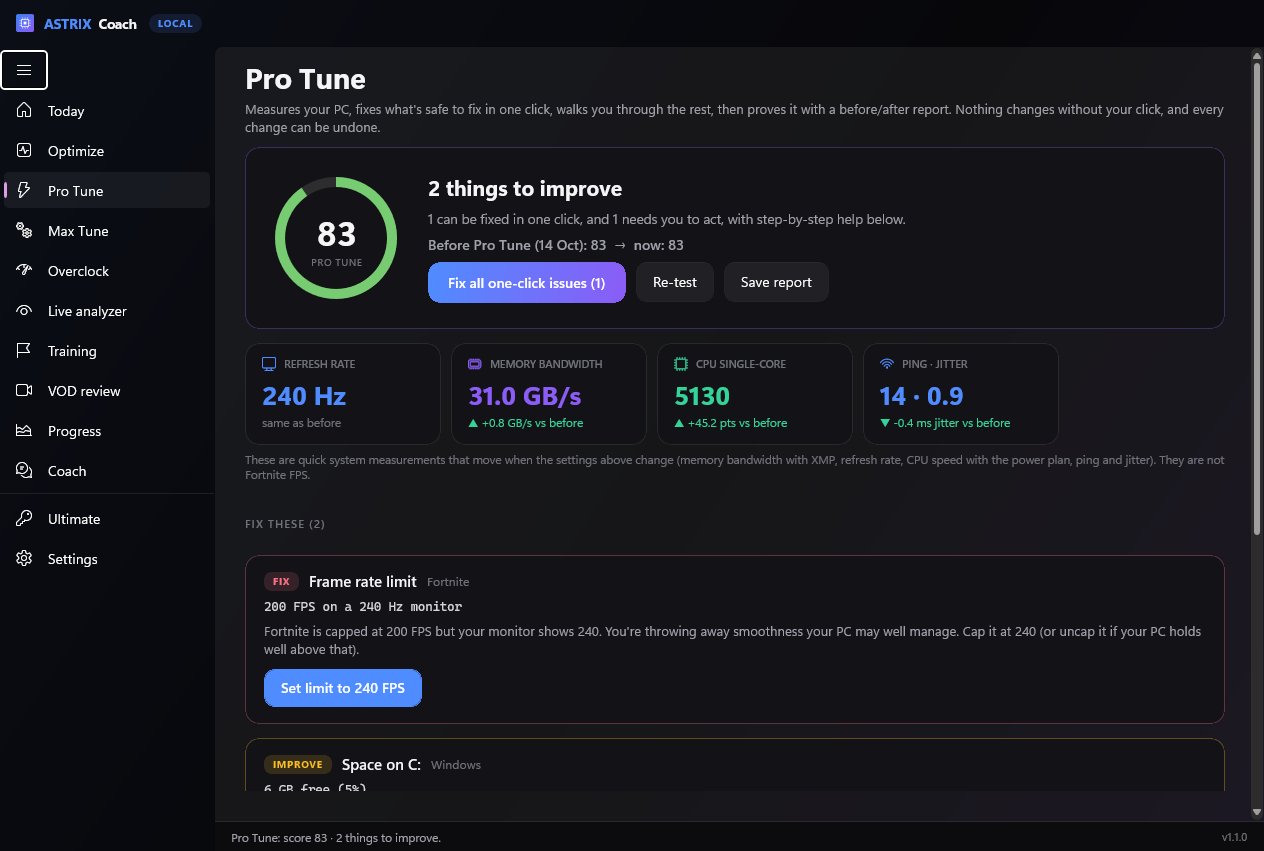
A guided tune for Fortnite PCs. It checks 13 things that really cost FPS or add lag, fixes the safe ones in one click, walks you through the rest (like XMP in the BIOS), then re-measures.
Max Tune
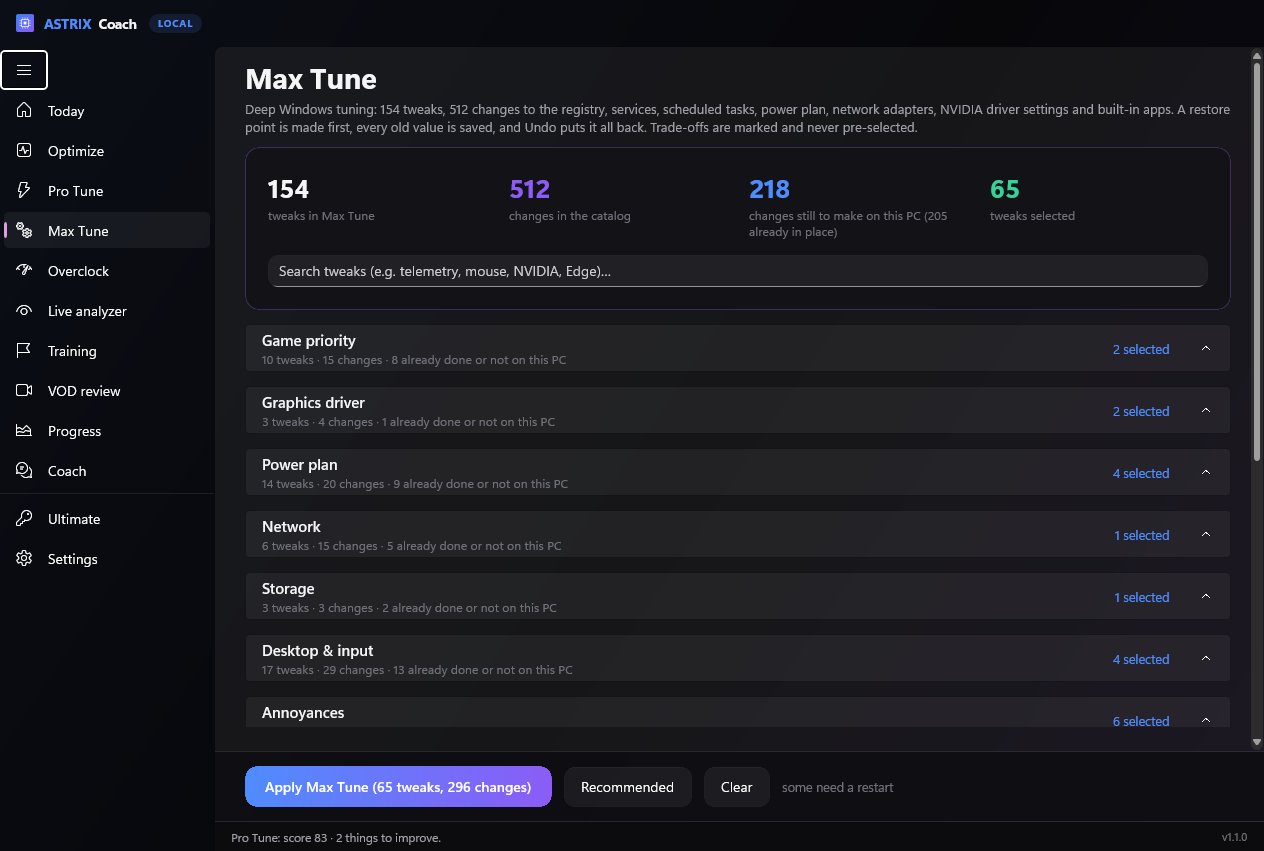
154 deep Windows tweaks, 512 changes: registry, services, scheduled tasks, power plan, network adapters, NVIDIA driver settings and bloatware. Restore point first, one-click undo.
Overclock
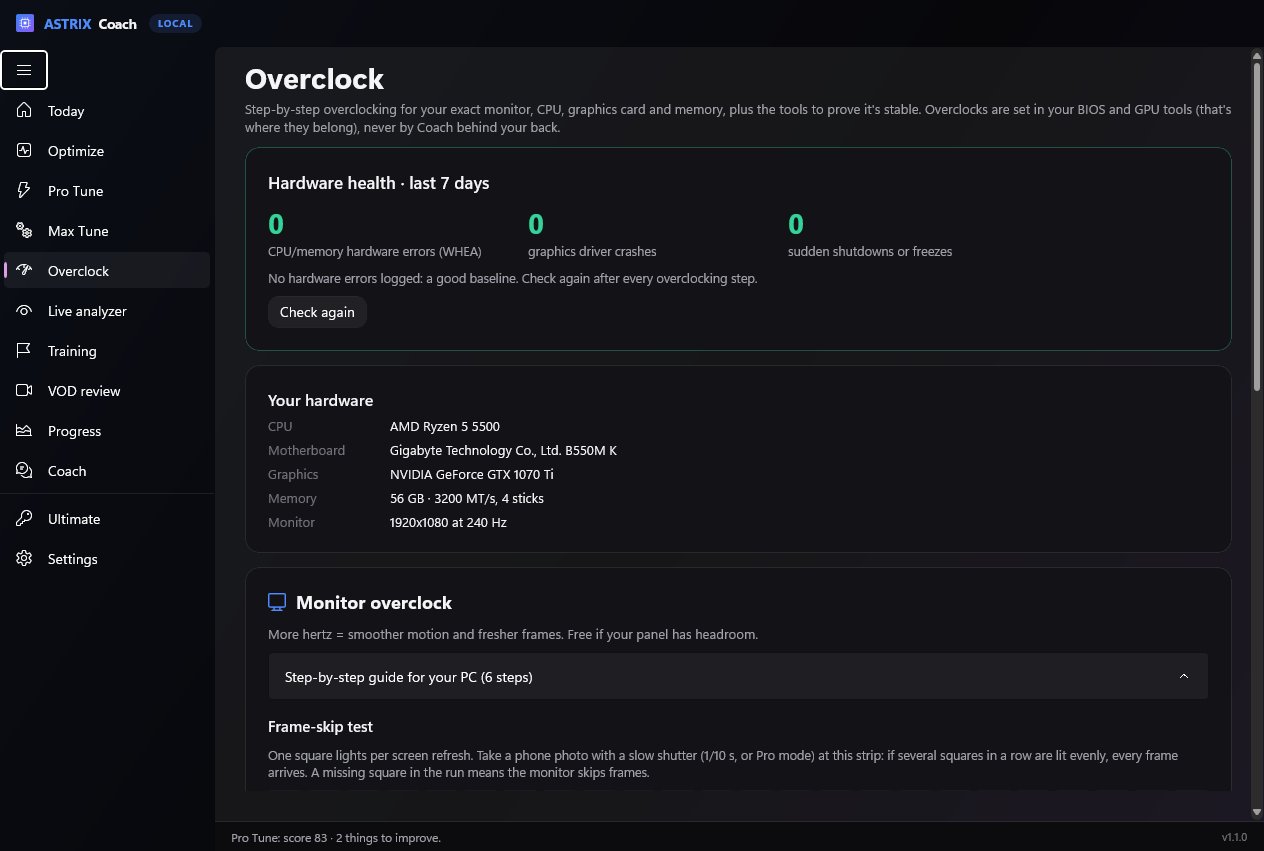
Step-by-step monitor, CPU, GPU and RAM overclocking for your exact hardware, plus a self-checking stability test, a memory check, a frame-skip test and Windows' hardware-error log.
Optimize
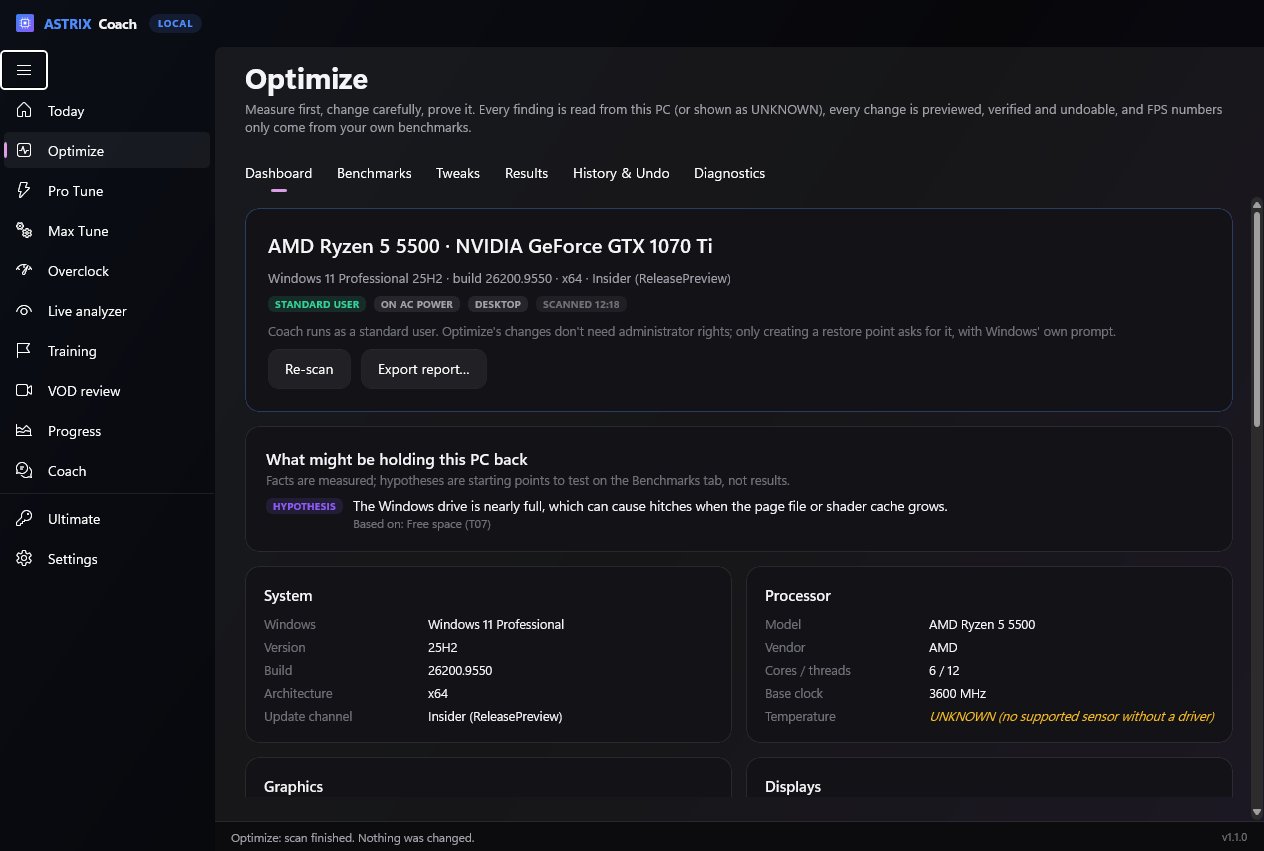
Measure first, then tune: a full read of your PC, benchmark import (CapFrameX / PresentMon) with honest before/after results, 12 safe tweaks with a dry run, verified changes and exact undo, plus bottleneck, network and throttling checks.
ASTRIX Coach
A coach that reviews your matches frame by frame and tells you the top three things to fix, with a session plan and drills picked from your actual mistakes, performance tracked session by session, aim and edit drills, a live screen analyzer, measured match skills and a daily training plan. It only watches your screen: no injection, no memory reading.
MEGA
The all-in-one Windows toolkit: 373 tweaks, Hyper Cleaner, Drive Explorer, Game Center and 25 modules. $20 on its own.
Astrix Optimizer Pro
All 306 Optimizer tweaks, CPU scheduling and the Mainframe control suite. $10 on its own.
Every future app
New Astrix apps unlock with the same key, and every update to the apps above is included.
See it
Real screenshots of ASTRIX Coach, taken on a Ryzen 5 5500 + GTX 1070 Ti PC.
Tuned, then proven.
Most optimizers flip settings and hope. Pro Tune measures first, tells you what it found in plain words, and re-tests after.
- Monitor stuck at 60 Hz on a 144/240 Hz screen: switched in one click.
- RAM below its rated speed (XMP/EXPO off): step-by-step BIOS guide for your motherboard brand.
- Fortnite settings: FPS cap below your refresh rate, V-Sync, window mode. Fixed safely, even if you locked the file.
- Windows: mouse acceleration, Game Bar recording, Game Mode, power plan, windowed-game latency.
- Also checks: single-channel RAM, driver age, background CPU, startup apps, disk space, ping and jitter.
- Before/after report you can save: refresh rate, memory bandwidth, CPU and network, measured.
FIX Monitor refresh rate
60 Hz · supports 144 Hz
FIX Memory speed (XMP)
2133 MT/s · kit rated 3200
IMPROVE Frame rate limit
120 FPS on a 144 Hz monitor
GOOD Mouse acceleration off
GOOD Game Bar recording off
Example. Your results depend on your PC.
As deep as Windows goes, and fully undoable.
Game priority, NVIDIA driver settings, power-plan internals (core parking, boost, USB and PCIe power saving), network-adapter power saving, telemetry services and tasks, privacy, browser background apps, bloatware, storage, input and desktop. Every item says exactly which registry value, service, task or app it changes.
- Restore point first, then every old value is saved before anything changes.
- Made for your PC: it reads your PC first, shows what's already set, and skips what doesn't apply (like NVIDIA settings on an AMD card).
- Trade-offs are marked (like turning off Memory Integrity or Spectre fixes for more FPS) and never pre-selected.
- One admin prompt, and your per-user settings stay on your account.
- No placebo, no padding. Myths (like Nagle for Fortnite's UDP traffic or "QoS bandwidth reserve") and anything that weakens Windows Update, Defender or parental controls aren't in it.
Overclock it. Then prove it's stable.
Real overclocks live in your BIOS and GPU tools, so Coach doesn't poke your hardware behind your back. It tells you exactly what to change for your monitor, CPU, motherboard and graphics card, and gives you the tools to check the result.
- Monitor: custom refresh rate steps for NVIDIA, AMD or CRU, plus a frame-skip test that catches fake overclocks.
- CPU: Ryzen PBO and Curve Optimizer or Intel ratio steps, with your motherboard's exact BIOS menu path. (Honest warning for Intel 13th/14th gen: don't.)
- Stability test: loads every core with maths whose answers are known, and checks every result bit for bit.
- Memory check and hardware health: CPU/RAM errors, GPU driver crashes and sudden shutdowns from Windows' own logs.
How it works
Buy once
Secure checkout by Stripe. Your ASTRIX-ULTRA-… key arrives by email within a minute.
Install the apps
Download MEGA, ASTRIX Coach and the Optimizer below. Paste the key into each (Coach finds it in MEGA by itself).
Run Pro Tune
Open Coach → Pro Tune, fix what it finds, then try Max Tune. Re-test to see what changed.
Downloads
Windows 10 (1809+) and 11, 64-bit. Each app asks for your key the first time it opens.
Questions
Is it a subscription?
No. You pay $99.99 once and keep it, including every update to the apps.
How many PCs?
Up to 3 PCs, for every app. If you replace one, ask on Discord and we'll move the key.
Is there a discount?
Yes: an invite link or code from someone who owns MEGA or Ultimate takes 15% off, so Ultimate is $84.99. Owners earn $20 for each Ultimate bought with their code (see Earn money).
Will it double my FPS?
No honest tool can promise that. Pro Tune finds real problems (a monitor stuck at 60 Hz, RAM without XMP, a low FPS cap) and those can make a big difference. If your PC is already set up well, it tells you so. The report shows what actually changed.
Is Max Tune safe?
It makes a restore point first, saves every value it changes, and one click undoes everything (removed apps are re-installed from your PC). Trade-offs that lower security are clearly marked and never selected for you. It never touches anti-cheat, Windows Update security fixes, Defender or parental controls.
Why 512 changes and not 10,000?
Because there aren't 10,000 Windows changes that make a PC faster. Tools that claim that count every tiny value separately or pad the list with placebo and risky tweaks. Every one of Max Tune's 512 changes does something real, and the app shows you exactly what.
Will overclocking damage my PC?
The guides use small, conservative steps and the vendors' own safety limits. Monitor overclocks can't damage a monitor (an unsupported rate just shows black and Windows switches back). Coach never changes voltages or clocks itself, and it tells Intel 13th/14th-gen owners not to overclock at all.
Can Coach get me banned?
Coach only looks at your screen, like a screen recorder. It never injects into the game, reads its memory or sends input.
I already own MEGA. What changes?
Ultimate is its own key and includes MEGA, so MEGA keeps working with either key. Ask on Discord if you have questions before buying.
Refunds?
Within 24 hours of purchase, like every Astrix product. See the refund policy.
Everything. One key. $99.99 once.
Pro Tune, Max Tune, ASTRIX Coach, MEGA, Optimizer Pro and every future app.