MEGA.

Everything your PC needs. One app.

An optimizer, a deep disk cleaner, a drive manager, a game center, network tools, a security check and a dozen everyday utilities — in one premium dark app that shows you every change before it makes it.

10% offUse code at checkoutApply it
v1.4.9 One-time · no subscription Windows 10 (1809+) & 11 · 64-bit ~170 MB No admin needed to install
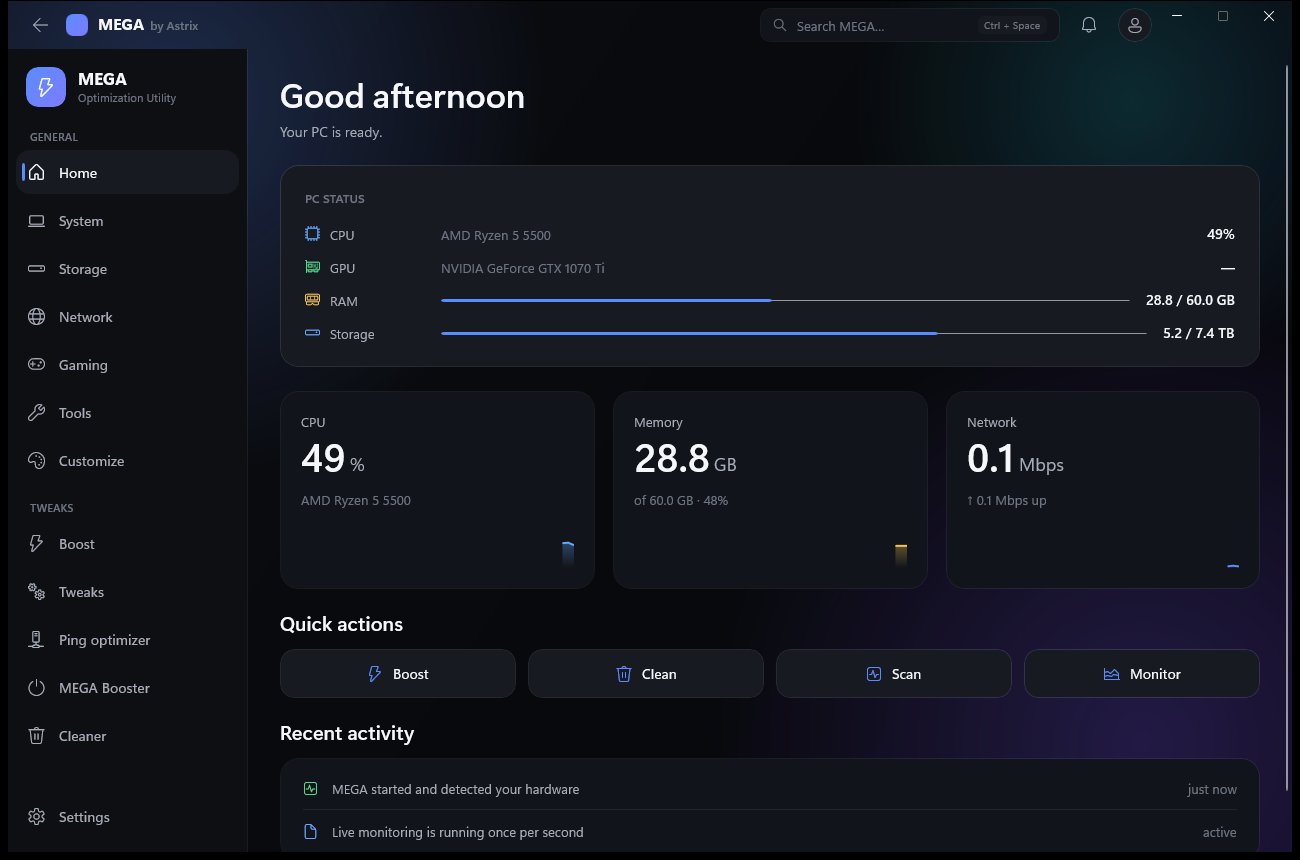
MEGA home screen with live PC status and quick actions
373real Windows tweaks
24working modules
6network tools
1×activation, then offline
Tweaks

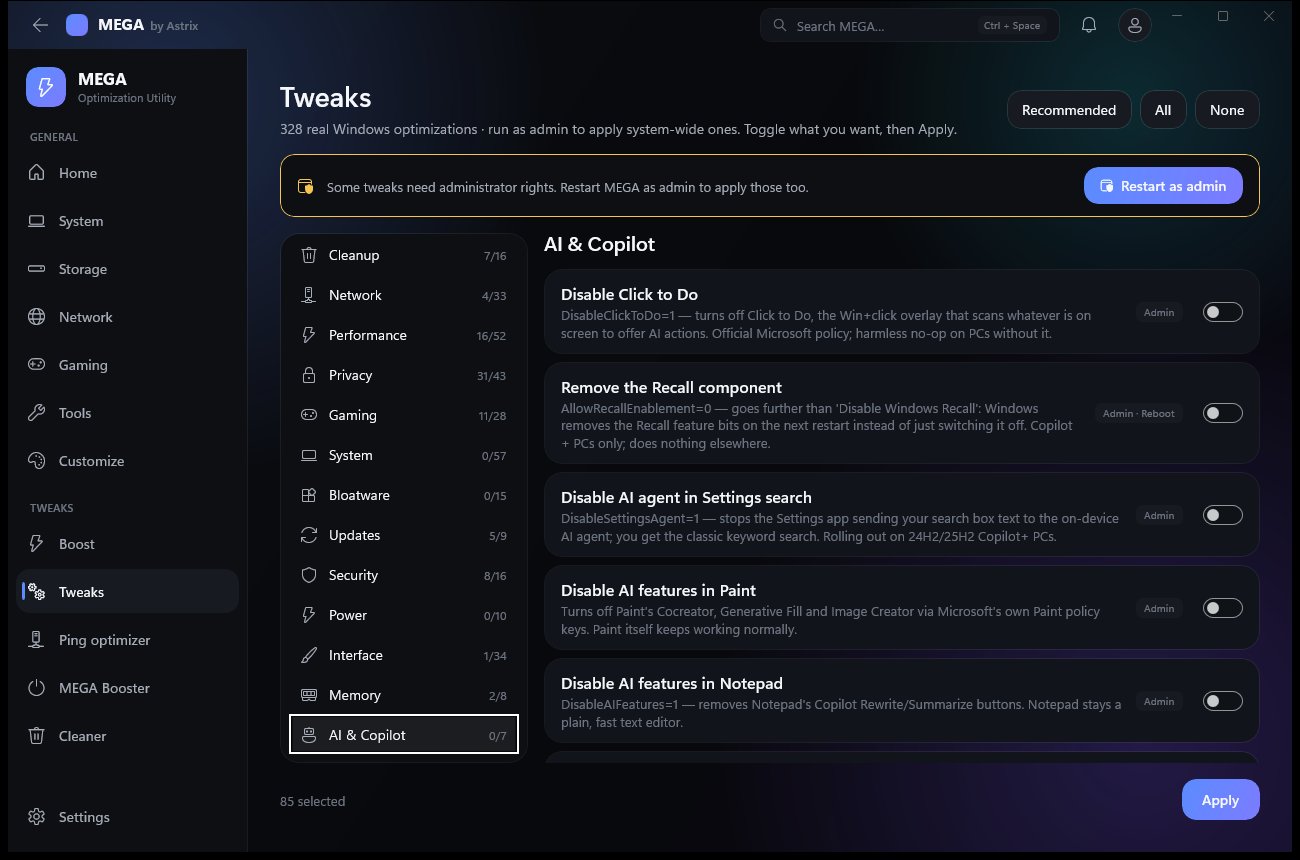
373 real Windows optimizations.

Pick a category, toggle what you want, press Apply. Every tweak says what it does and whether it needs admin or a restart. They're Windows' own settings — MEGA never patches system files.

MEGA Tweaks page with categories and toggles
Hyper Cleaner

Finds the space other cleaners miss.

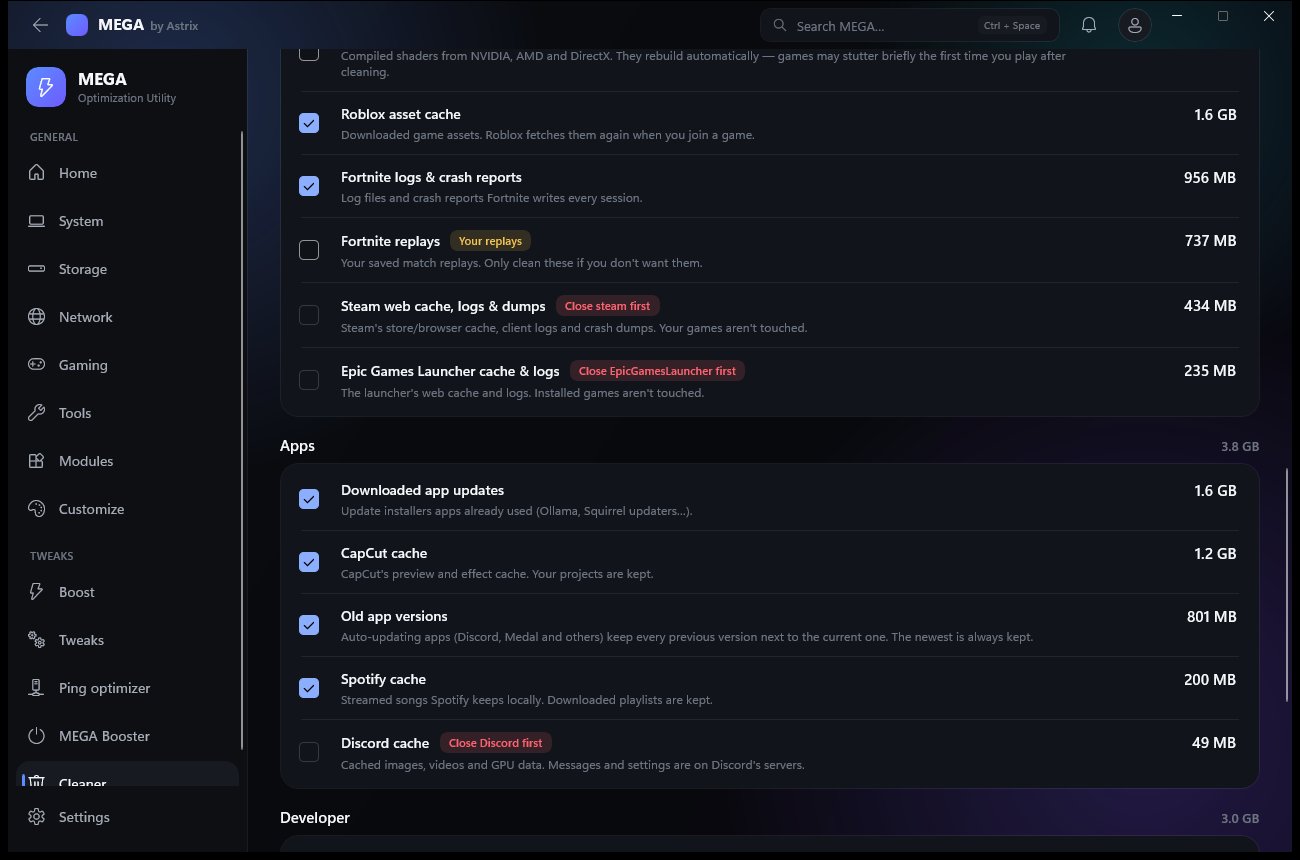
About 35 kinds of leftovers in five groups. Every item shows its size and what happens if you clean it — “re-downloads in-game”, “brief stutter first launch”, “your replays”.

  • Windows — temp, update downloads, crash dumps, Windows.old, component store
  • Browsers — caches only, never history, passwords, cookies or tabs
  • Games — Fortnite content & logs, Steam & Epic caches, shader caches
  • Apps — Discord, Spotify, VS Code, CapCut, old auto-update versions
  • Developer — npm, pip, NuGet, Yarn, Cargo, Gradle, Unreal DDC
  • Safe picks selects only the free wins; open apps are skipped
MEGA Hyper Cleaner with groups of cleanable items and their sizes
Drive Explorer

See what fills a drive. Move it somewhere else.

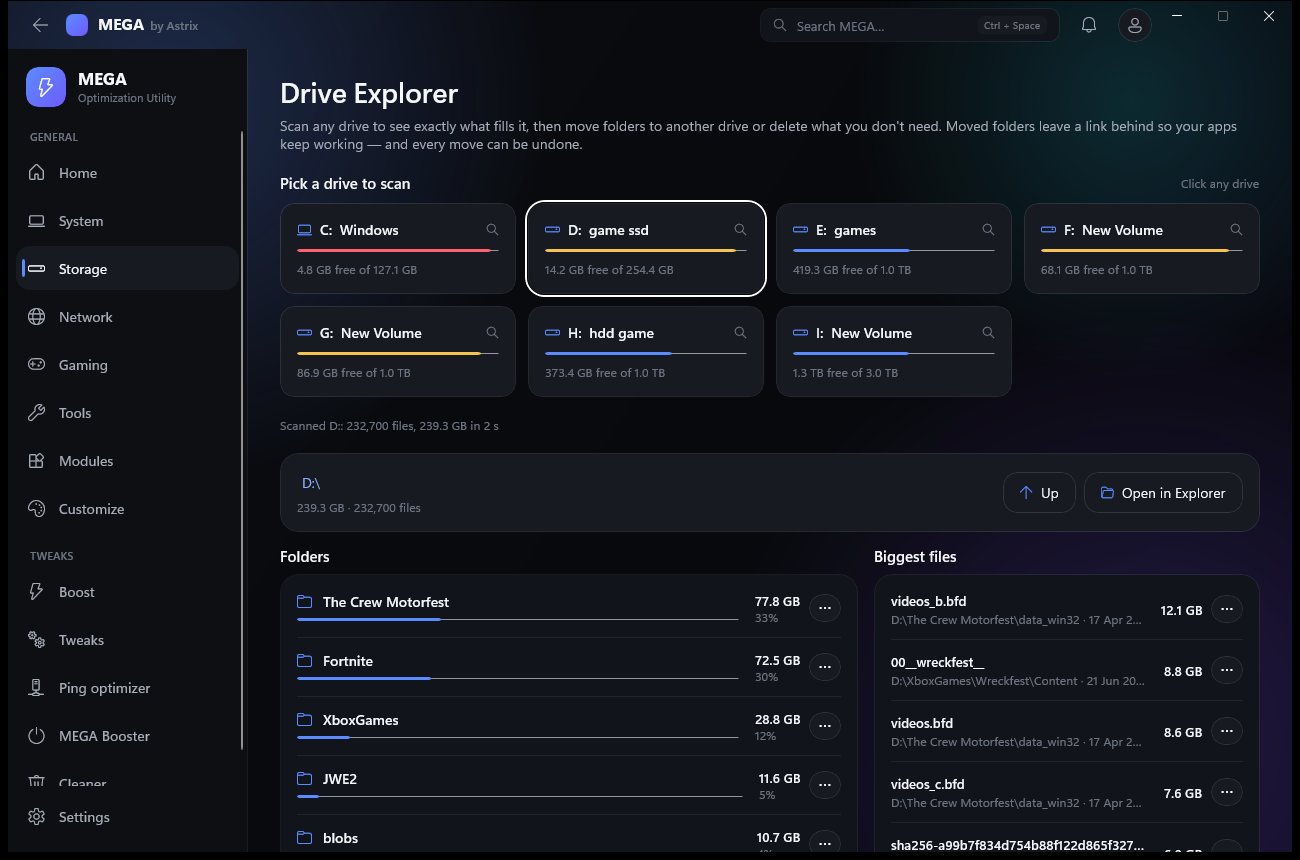
Scan any drive and get folders sorted by size, a click-through tree and a “Biggest files” list — hundreds of thousands of files in seconds.

  • Move to another drive — every file is copied and checked, then a link is left behind so your apps keep working.
  • Personal folders — Documents, Downloads, Pictures, Videos and Music move the official Windows way, so everything follows.
  • Moved by MEGA lists every move with an Undo button. “Free up C:” suggests the biggest safe moves.
  • Windows, Program Files and the core of your profile are protected — the menu tells you why.
MEGA Drive Explorer scanning a drive
Game Center

Move a game — saves, downloads and all.

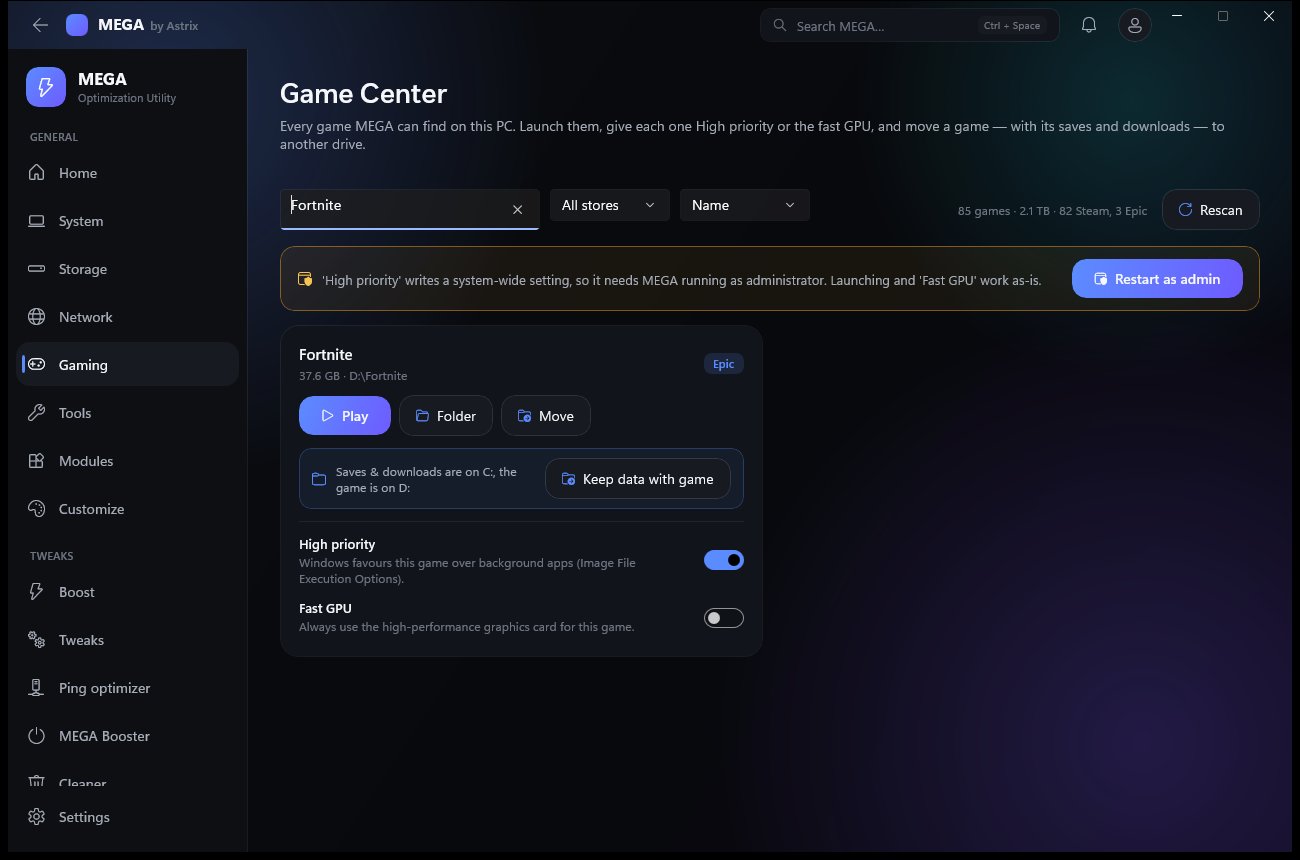
Every Steam and Epic game on every drive, with search, store filter and sort. Play, open the folder, set High priority or the Fast GPU per game — or move it.

  • Epic games move for real. Epic's own records are updated, so Play, updates and Verify just work — no re-download. Shared add-ons like LEGO Fortnite move too.
  • Keep data with game — one click brings a game's settings, downloaded content, replays and saves onto the game's drive. Warns if that leaves too little room for updates.
  • SSD or hard drive shown per drive, an estimated time, then live speed and time left with Cancel. Undo any time.
  • Steam: Steam's own safe mover is explained for the game files; MEGA moves the saves and downloads.
MEGA Game Center
Network & speed

Measure first. Then fix.

Six real network tools, a ping optimizer that tests before and after, and two kinds of boost for when you're about to play.

Network tools

Ping with jitter and loss, traceroute, a DNS test against your DNS and five public resolvers that spots router or ISP interception, a Cloudflare speed test, a 100-ping packet-loss graph, and every adapter's IP, gateway, DNS and speed.
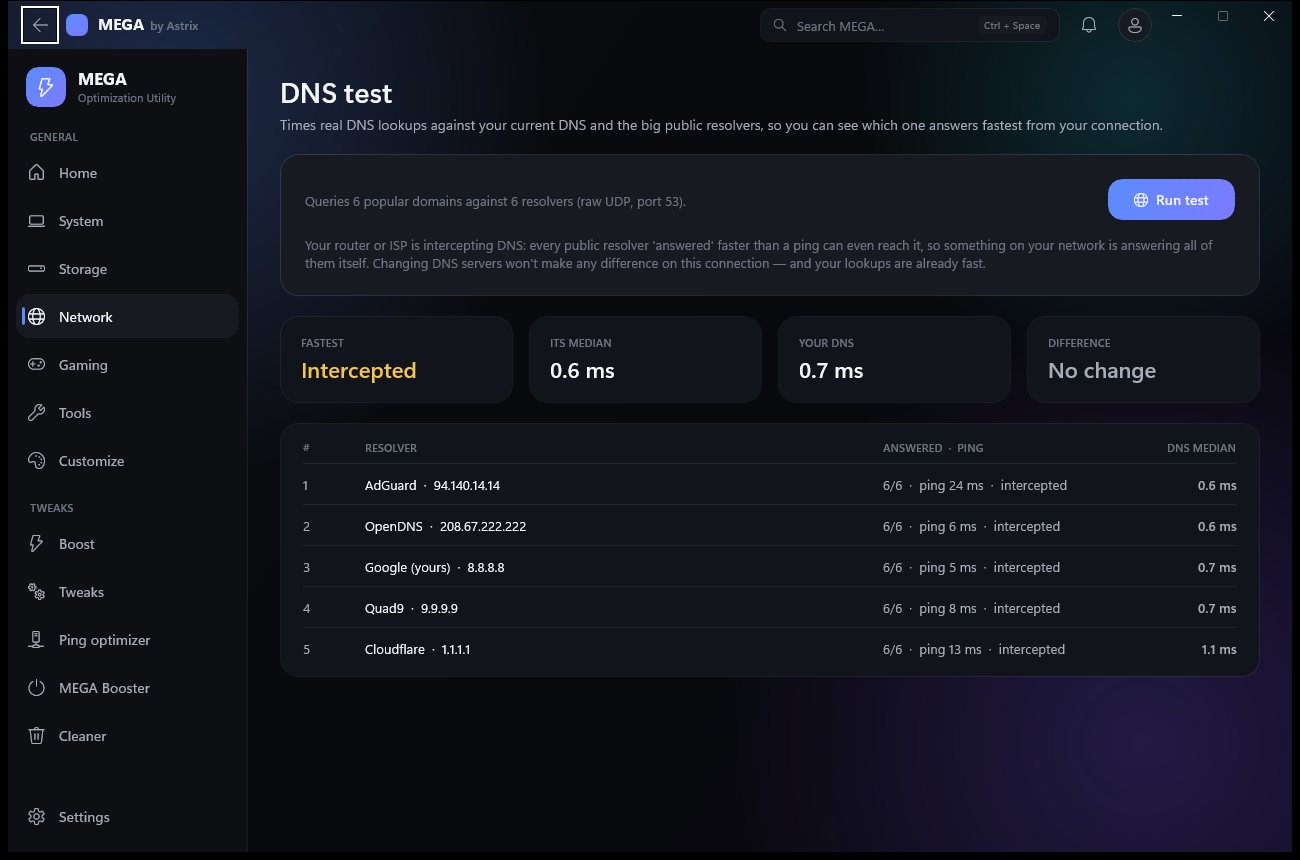

MEGA DNS test comparing resolvers

Boost & MEGA Booster

Boost is one press: Game Mode on, background apps to low priority, unused RAM handed back, power plan switched — and it tells you exactly what it did. MEGA Booster closes every app not on your whitelist and keeps them closed until you turn it off.
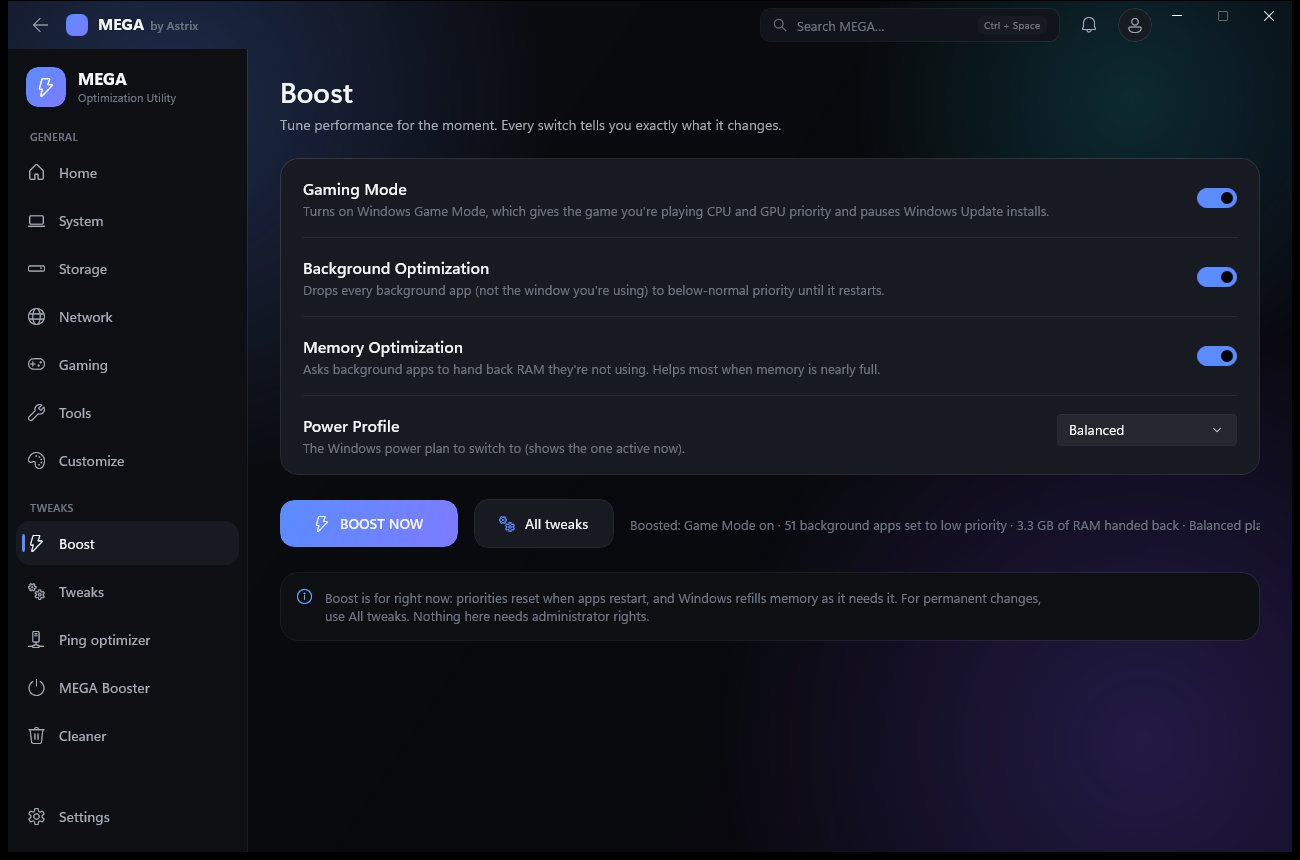
MEGA Boost page
Modules

All 25 modules. Every one works.

Open them from the Modules grid, the Tools page, or Ctrl + Space — type “benchmark”, “dns” or “fortnite” and jump straight there.

Gaming

Game CenterEvery Steam & Epic game; launch, optimize, move.
MEGA BoosterClose everything but your game.
Gaming guide1,000 gaming PC & Fortnite tips, searchable; the ones MEGA can do are one click away.

Performance

Tweaks373 real Windows optimizations.
BenchmarkCPU (1 core / all cores), RAM bandwidth, real uncached disk speed.
BoostOne press: Game Mode, priorities, RAM, power plan.

Display

DisplayResolution & refresh per monitor; spots a 144/240 Hz screen stuck at 60 Hz; reverts in 15 s unless you keep it.

Network

Ping optimizerMeasure and lower game latency.
Network toolsTraceroute, DNS test, speed test, packet loss, adapters.
Hosts fileView and edit the hosts file — backed up before every save.
Wi-Fi passwordsSaved networks and their passwords. Never leave your PC.

System

ServicesEvery service: start, stop, startup type. Critical ones are locked.
DriversEvery driver with its age, plus official download links.
Restore pointsCreate a System Restore point; open System Restore.
Process managerLive CPU and memory per process; end tasks.
Startup managerControl what runs at sign-in.
Uninstall appsRemove installed programs.

Storage

Hyper CleanerFinds the space other cleaners miss.
Drive ExplorerScan any drive; move folders and games to another drive.
Large & duplicate filesFind big files and exact copies. Deletes go to the Recycle Bin.

Security

Security checkDefender, firewall, UAC, Secure Boot, SmartScreen, RDP, SMBv1, updates — scored, with a fix for each. Not an antivirus.

Utilities

Password generatorCryptographically random, with a strength meter.
Color pickerGrab any colour on screen as HEX, RGB or HSL.
Unit converterLength, data, temperature, bandwidth, FPS ↔ frame time and more.
ScreenshotWindows' snipping tool in one click.
Every category

14 categories. Read every tweak before you buy.

The full list is public — names, descriptions, and which ones need a restart.

MEGA Setup

An installer that checks before it copies.

Download MEGA.exe and run it. A small splash unpacks the installer, then Setup walks you through it.
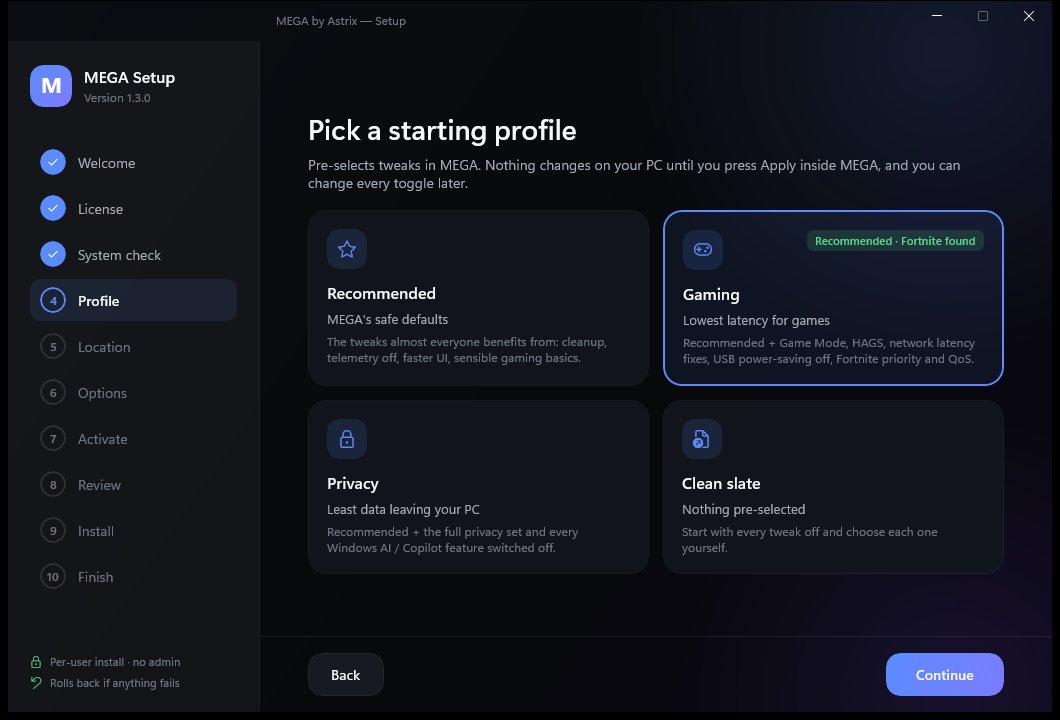
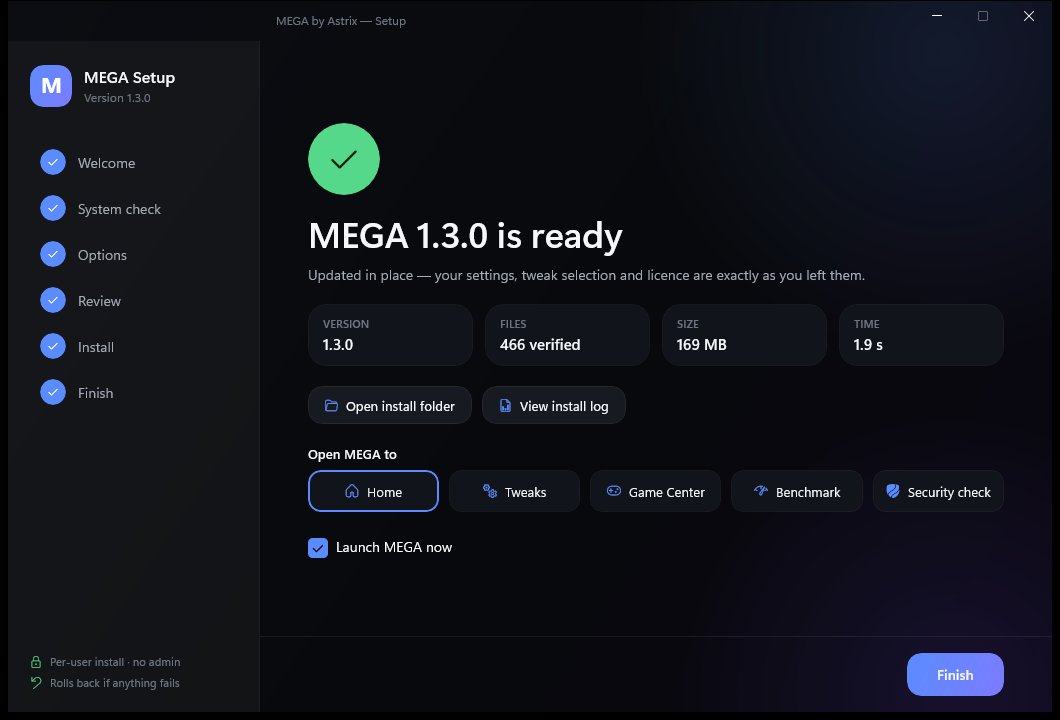
  1. Welcome — version, what's included, and a check that you're installing the newest release.
  2. System check — Windows version, disk space, pending restarts, internet, old MEGA leftovers. Shows your CPU, GPU and RAM.
  3. Profile — Recommended, Gaming, Privacy or Clean slate. Nothing is applied until you press Apply in MEGA.
  4. Location & options — any folder or drive, shortcuts, start with Windows, a restore point first.
  5. Activate your key (or later), review exactly what Setup will do, then install with live progress.
Setup closes a running MEGA first, backs up the previous version and puts it back automatically if anything fails, then verifies every file byte-for-byte. Already installed? It offers Update / Repair instead.
MEGA Setup profile step
MEGA Setup finished screen
Trust

Easy to leave. Nothing hidden.

A real uninstaller

Before removing anything it lists everything MEGA added — app, shortcuts wherever they are, startup entry, scheduled task, the Fortnite network rule, setup leftovers. You choose whether to keep your settings and licence.

Private by default

No data sold or shared. MEGA goes online only to activate, check for updates, sync if you sign in, and run tests you start. Anonymous diagnostics are off. Wi-Fi passwords and your hosts file never leave the PC.

Updates without nagging

MEGA checks on start and asks once per version. The update downloads, closes MEGA, replaces the files in place and relaunches. Every 1.x update is included.

Requirements

Runs on any modern Windows PC.

Windows
Windows 10 version 1809 or newer, or Windows 11 — 64-bit
Disk space
About 170 MB
Admin rights
Not needed to install or run. Items marked “Admin” ask Windows when you use them.
Internet
Once, to activate. Then for update checks and online tests you start.
Licence
One PC per key (Astrix Ultimate: up to 3). Replacing your PC? Ask on Discord and we'll move it.
Price
$20 once — every module, every tweak, every 1.x update
For IT & power users

Scriptable from day one.

# silent install with the same choices on many PCs
MEGA.exe /S [/D=<folder>] [--profile recommended|gaming|privacy|clean]
         [--no-desktop] [--no-startmenu] [--startup] [--restore-point]

# open straight to a page
MEGA.exe --open module:games

# run the scheduled auto-optimize and exit
MEGA.exe --optimize

# silent uninstall
MEGA.exe --uninstall --quiet [--remove-data] [--remove-licence]
Version history

Shipping steadily.

1.4.9 Latest

  • Beta updates: try new MEGA features early. A beta always comes with a clear warning and an Ignore button, so you can stay on the stable version, and “Don’t show me beta updates” turns them off. The website download is always the stable version.

1.4.8

  • 14 new tweaks for Windows 11 24H2 and 25H2 (373 in all), including hiding the account nags on the Start menu, blocking apps from Windows’ built-in text and image AI, and stopping OneDrive’s folder-backup prompts. The rest are privacy controls plus a smaller hibernation file that keeps Fast Startup.
  • All of them are off until you pick them, and none claims more FPS.

1.4.7

  • 7 new tweaks (359 in all), including more than one restore point a day, Windows Photo Viewer back in “Open with”, and no automatic sign-in after update restarts. The rest are privacy and Explorer fixes.
  • The advertising ID, activity history and Widgets tweaks now switch off every setting for those features, not just one.
  • Your invite card shows the Astrix Ultimate discount: 15% off Ultimate with your code + “U”, and $20 for you per Ultimate sale (how it works).

1.4.6

  • Astrix Ultimate keys (ASTRIX-ULTRA-…) unlock MEGA. Your invite card now says anyone who uses your link or code gets 10% off.

1.4.5

  • Your invite link now gives friends 10% off MEGA, and you still earn $3 for every purchase made with it (how it works).

1.4.4

  • Invite friends: your Account page now shows your invite link and code. You earn $3 for every MEGA purchase made with it (how it works).

1.4.3

  • The download is now a standard Inno Setup package that antivirus tools recognise and scan properly, so fewer false alarms. Same glass installer as before.

1.4.2

  • Stronger licence protection: your licence is verified with a signed check tied to your PC that renews itself when you’re online. Nothing to re-enter — just open the app online once after updating.

1.4.1

  • New sidebar: every page, tool and module is in six dropdown groups (Performance, Gaming, Clean & storage, System, Network, Utilities) with no scrolling. The page you’re on stays highlighted however you got there.

1.4.0

  • Gaming guide — 1,000 practical gaming PC & Fortnite tips, searchable, with one-click links to the 137 MEGA can do
  • 352 tweaks: Fortnite competitive video settings, Performance mode, native resolution and an FPS cap at your refresh rate, plus safe Windows defaults from the guide
  • Safer uninstall: MEGA removes only the files it installed — never anything else in the folder

1.3.0

  • Hyper Cleaner and Drive Explorer — scan any drive, move folders with links, move personal folders, undo any move
  • Game Center moves games to another drive with their saves and downloads; “Keep data with game”
  • 21 → 24 working modules, including Benchmark, Display, Security check, Services, Drivers and Hosts file
  • Boost and Customize make real changes; any accent colour
  • New installer with system check, profiles, activation and repair/rollback, plus a full uninstaller

1.2.x

  • 338 tweaks, including new Fortnite and AI & Copilot sections from a Windows 11 24H2/25H2 research pass
  • Working network tools; edge-to-edge layout

1.2.0

  • MEGA Booster, Ping optimizer, Tweaks page redesign, sidebar navigation

1.1.0

  • App uninstaller, scheduled auto-optimize, large & duplicate file finder, Google sign-in with cloud sync

1.0.0

  • First release: live dashboard, process and startup managers, cleaner, 306 tweaks, installer, licence activation
MEGA by Astrix

$20 once. Yours for good.

Secure checkout by Stripe. Your licence key (ASTRIX-MEGA-…) is emailed to you. Activate it in Setup or on first launch. Refundable within 24 hours of purchase (refund policy).

10% offUse code at checkoutApply it

Questions first? Ask on Discord · Read the FAQ · Licence & privacy